Xeo
This is Xeo

Thank you for choosing Dynaudio Xeo.
Xeo combines the latest wireless technology with impressive sound quality and makes listening to music truly convenient and easy. The next few pages contain important information on connecting the system and its operation to ensure perfect function and the best-possible sound quality. We hope you have a great time listening to your favourite music.
Dynaudio
About This Product
The active Xeo 10/20/30 speakers are equipped with powerful integrated amplifiers and allow for the direct connection of various analog and digital audio sources. A Bluetooth interface enables the operation of Bluetooth devices and plays them back in optimal sound quality. Optional components like Xeo Hub or Dynaudio Connect enable setting up a wireless multiroom system without any restrictions to the highest sound quality. The speakers can be fully controlled with a remote control. The operational state of the system is indicated by two LEDs on the front.
About This Manual
This manual describes the operation of the Xeo 10/20/30 speakers. Information about the optional Xeo modules (Hub, Connect, Extender, Link) can be found in the Owner´s manual provided with these modules.
Important Safety Instructions
- Read these instructions.
- Keep these instructions.
- Heed all warnings.
- Follow all instructions.
- Do not use this apparatus near water.
- Clean only with dry cloth.
- Do not block any ventilation openings. Install in accordance with the manufacturer’s instructions.
- Do not install near any heat sources such as radiators, heat registers, stoves, or other apparatus (including amplifiers) that produce heat.
- Do not defeat the safety purpose of the polarized or grounding-type plug. A polarized plug has two blades with one wider than the other. A grounding type plug has two blades and a third grounding prong. The wide blade or the third prong are provided for your safety. If the provided plug does not fit into your outlet, consult an electrician for replacement of the obsolete outlet.
- Protect the power cord from being walked on or pinched particularly at plugs, convenience receptacles, and the point where they exit from the apparatus.
- Only use attachments/accessories specified by the manufacturer.
 Use only with the cart, stand, tripod, bracket, or table specified by the manufacturer, or sold with the apparatus. When a cart is used use caution when moving the cart/apparatus combination to avoid injury from tip-over.
- Unplug this apparatus during lightning storms or when unused for long periods of time.
- Refer all servicing to qualified service personnel. Servicing is required when the apparatus has been damaged in any way, such as power supply cord or plug is damaged, liquid has been spilled or objects have fallen into the apparatus, the apparatus has been exposed to rain or moisture, does not operate normally, or has been dropped.
- WARNING: To reduce the risk of fire or electric shock, this apparatus should not be exposed to rain or moisture and objects filled with liquids, such as vases, should not be placed on this apparatus.
- To completely disconnect this equipment from the mains, disconnect the power supply cord plug from the receptacle. The mains plug of the power supply cord shall remain readily operable.
Warning
RISK OF ELECTRIC SHOCK! DO NOT OPEN!
If the speakers are connected to the mains voltage, a dangerous electrical voltage is present inside the speakers.

Use the supplied power cable to connect the speakers to the mains voltage. Make sure that the power supply cable is not damaged; replace it with a new one if it has been damaged.

CAUTION
- To reduce the risk of electric shock, do not remove the back panel and never open the speaker housing. Do not expose the speakers to rain or moisture.
No user serviceable parts inside. Refer servicing to qualified personnel. - Do not operate defective speakers and disconnect defective speakers from the mains voltage. Please contact your Dynaudio Xeo distributor if you have any problems. Distributor addresses can be found on the Internet at dynaudio.com.
Remote Control Battery
Danger of Explosion
CAUTION
Danger of explosion if battery is incorrectly replaced.
- Replace only with the same or equivalent type.
Chemical Burn Hazard
CAUTION
If the coin/button cell battery is swallowed, it can cause severe internal burns in just 2 hours and can lead to death.
If you think batteries might have been swallowed or placed inside any part of the body, seek immediate medical attention.
Unpacking
After unpacking, make sure the system is complete and check the device and all accessories for transport damage. Transport damage may be expected if the packaging is already severely harmed. Do not attempt to start up a damaged device. If the contents are incomplete or damaged, please contact your Dynaudio Xeo distributor. Distributor addresses can be found on the Internet at dynaudio.com.
Removing the Protection Cap

The tweeter is protected by a cap to prevent damage during transport and unpacking.
- After you have unpacked the speaker, remove the cap by just pulling it straight out.
Packaging Material
The packaging has been designed so that it may be reused as long as it has not been damaged during transport. Keep the packaging and use the original packaging for all further transport.
Disposal
Disposal of used electrical and electronic equipment (applicable in European countries with separate collection systems for this equipment)

This symbol on the product or its packaging indicates that the product must not be treated as household waste. Instead, it must be handed over to the applicable collection point for the recycling of electrical and electronic equipment. By ensuring this product is disposed of correctly, you will help prevent potential negative consequences for the environment and human health. The recycling of materials helps to conserve natural resources. For more detailed information on recycling this product, please contact your local authority, community waste disposal office, or the shop where you purchased the product.
Scope of Delivery

1 2 Xeo 10/20/30 speakers
2 2 Xeo 10/20/30 speaker cloth covers
3 1 Xeo 10/20/30 remote control
4 2 power cables (country-specific version, length: 2.5 m)
5 1 stereo cable (RCA – RCA, length: 1.5 m) – Xeo 10 only
6 1 optical cable (Toslink – Toslink, length: 1.5 m) – Xeo 10 only
7 1 stereo cable mini jack (3.5 mm – 3.5 mm, length: 1.5 m) – Xeo 10 only
1 Xeo first time setup manual: quick guide for installation (not shown)
Connections and Control Elements
On this page:
This section describes the connections and control elements. Please contact your Dynaudio Xeo distributor if you have any problems with connection and start-up. Distributor addresses can be found at dynaudio.com.
Elements on the Rear Panel
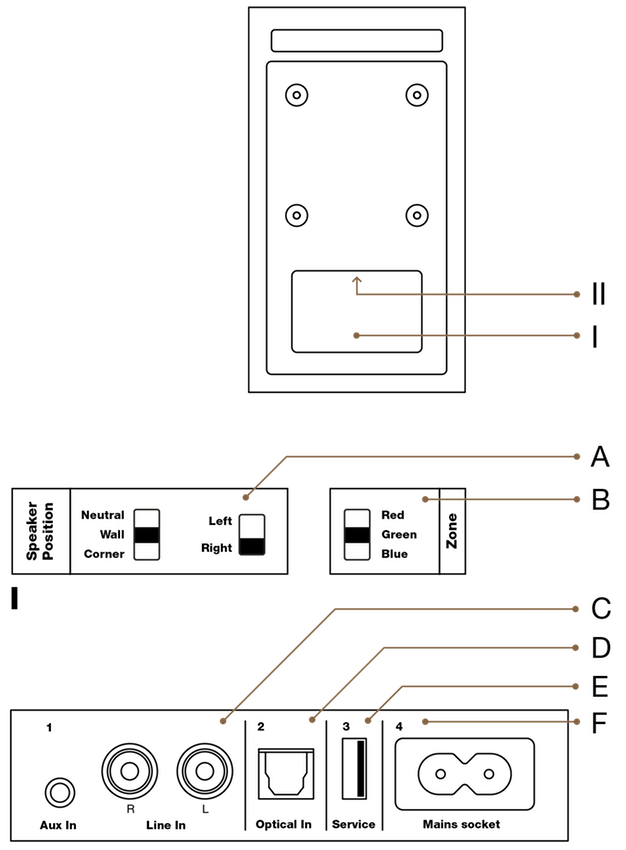
The Xeo 10/20/30 set consists of a master and a slave unit. The master unit carries the audio input interfaces.
A: Speaker position
Sound adjustment (depending on the position of the speakers)
- Neutral = with free-standing placement
- Wall = if placed near a wall
- Corner = if placed in a corner
Speaker placement
- Left = left speaker for stereo mode
- Right = right speaker for stereo mode
B: Speaker ID/Zone
Selection of audio zones: Speakers assigned to different zones can be controlled separately via the remote control. The zones are identified as Red, Green, and Blue.
C
 Aux In: To connect an analog audio source to the speaker via mini jack.
 Line In: To connect an analog audio source to the speaker via RCA.
D

Optical In (Toslink): To connect a digital audio source to the speaker.
E

USB In
For firmware update only.
F

Mains socket
To connect the speaker to the mains voltage.
Buttons on Top of the Cabinet (Xeo 10)
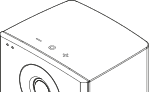
Speaker On / Off
- Press
 to switch on the speakers. The Xeo 10 will scan the inputs for a signal.
 - Press and hold to switch off the speakers.
Input selection
- When switched on, press to jump to another input.
Volume control
- Press
 or
or  to raise or lower the volume level. Press and hold for faster adjustment.
Bluetooth Pairing
- Press and hold both and to start pairing.
Remote Control
 Commands will always apply to both of the speakers.
MUTE
Muting the speakers
- Press
 to mute or unmute the speakers.
Fixing the volume
- Press for at least 2 seconds to set a high volume for the speakers (see section “Fixing the volume”).
ON/OFF
Speaker On/Off
- Press
 to switch on the speakers.
 - Press
 for standby mode.
 - Press and hold until LED turns red to put speaker in sleep mode.
- Press and hold for 5-9 seconds to enter night mode (Turns the LEDs off).
Reset
- Press for at least 5 seconds to reset the speakers to the factory settings.
VOLUME
Volume Control
- Press
 or
or  to raise or lower the volume level.
INPUT
Signal Source
- Press a button to select the respective signal source.
 selects a Bluetooth device or Hub/Connect.
Bluetooth Pairing
- Press for at least 5 seconds to enter pairing mode.
Connecting and Setting Up
Positioning and connecting to mains voltage
- Position the speaker in the desired location.
- Do not expose the speaker to direct sunlight, heat, or moisture.
- Do not place the speaker near devices with strong electromagnetic radiation or devices that could be destroyed or damaged by magnetic fields.
- Use the power cable to connect the speaker to the mains voltage.
Tip Xeo 10:
- For easier access, the plate at the bottom of the cabinet can be removed. Use a coin or screwdriver to loosen the screw and attach the plate after connecting the power cable.
Cloth cover
The cloth cover has been designed so it does not influence the sound dispersion of the speaker. It is attached to the housing with magnets and may be removed if needed.
General settings
In stereo mode:
Select Left operating mode for the left speaker.
Select Right operating mode for the right speaker.
Set the speaker position switch that best describes the speaker’s need for acoustic compensation.
Neutral = with free-standing placement
Wall = if placed near a wall
Corner = if placed in a corner
Select the Red, Green, or Blue zone. Select the same zone for the right and left speakers. For additional information about the audio zones, see “Division Into Audio Zones”.
Connecting sources directly

- Connect your source cables to one or more of the audio inputs ,
 ,
,  of the master speaker – see “Connections and Control Elements”.
After it is turned on, the speaker automatically searches for an audio signal and then plays it back immediately. If several signal sources are active, one of the signal sources will be played back.
Tip (Xeo 10):
- For easier access, the plate at the bottom of the cabinet can be removed. Use a coin or screwdriver to loosen the screw and attach the plate after connecting the power cable.
Connecting a Bluetooth device

- To begin Bluetooth pairing, press and hold both and buttons on either one of your speakers (Xeo 10). Alternatively, hold Bluetooth on remote for 5 seconds.
Once available for pairing, the status indicator will blink white and it will be available for pairing for one minute. - Go to settings on your device, find the Bluetooth sub-menu, and simply pair your device with your Xeo speaker by selecting Red, Green, or Blue. The speaker will store your pairing.
Connecting sources via Hub or Connect

Xeo Hub and Dynaudio Connect are optional components that allow you to connect analog and digital sources and are linked with your Xeo speaker via a wireless, lossless signal. For further information about the complete Xeo system, please see “Components of the Xeo System”.
Operation
Switching on
To switch the speakers on from standby mode:
Press on top of one of the speakers (Xeo 10) or point the remote control at a speaker and press .
- The speakers will automatically search for an active audio signal. If found, the signal will be output (autoplay function).
- If there is no input signal, the speakers will continue scanning the inputs for the next 20 minutes and enter sleep mode.
If there is no input signal, the speakers will go into standby mode after a certain period.
Playback of Connected Sources
- Once you have connected your Xeo speaker with a direct input, simply choose your desired source on the remote.
- The speakers will automatically detect the signal and start playback. Master and slave speaker will connect wirelessly if set in the same zone.
- If no signal is applied to either input, the speakers will continue scanning the inputs for the next 20 minutes and enter sleep mode.
Playback of a Bluetooth Device
Once you have paired your device with your Xeo 10/20/30, you can connect by choosing the Xeo 10/20/30 from your list of Bluetooth devices.
- Select Bluetooth on the remote control and press play on your Bluetooth device.
Disconnect
The Off button has three functions:
- Standby Mode: Press the button to switch off speakers (Standby Mode).
- Night Mode: Press and hold the button for 5 to 9 seconds to enable/disable Night Mode. The LEDs will turn off, and they will only turn on shortly when you are interacting with the speakers.
- Deep Sleep: Press and hold the button until the speakers turn off. In Deep Sleep mode, auto-sensing functionality is turned off and low-wattage mode is engaged.
Fixing the Volume
You can set the speaker to a higher volume using the function to fix the volume. This setting also remains in effect in standby mode. If a signal source is connected to the Xeo 10/20/30 with its own volume control, you have the option to change the output volume across a broad range with the signal source.
To fix the volume:
- Point the remote control at a speaker and press for at least 2 seconds. To undo fixing, press one of the two volume buttons.
Standby
To switch speakers to sleep mode:
- Point the remote control at a speaker and press or press on top of one of the speakers.
- The speakers will enter sleep mode.
- The speakers also enter sleep mode if there is no audio signal for 20 minutes.
- In this mode, the wireless network is active and all connected units remain synchronized.
- Sleep mode power consumption is <2 W.
To switch speakers to low-power standby mode:
- Press and hold on the remote control for at least 5 seconds.
- The speakers go to low-power standby mode.
- In this mode, the wireless network is disabled and the speakers are not connected to each other.
- Low-power standby mode power consumption is <0.5 W.
To turn off auto standby:
- Press and hold on the remote control for at least 5 seconds.
Status LEDs on the front
The two LEDs in the upper left corner of the cabinet front indicate the operational state of the speakers and system with various colours and blinking functions.
On state


Illuminated in blue
The speaker is switched on, connected to a Hub or Connect, and an audio signal is played back.
On state

Slow blinking in blue
The speaker is switched on, connected to a Hub or Connect, but an audio signal cannot be found.
On state

Illuminated in purple
The speaker is switched on, connected to a local input, and an audio signal is played back.
On state
Slow blinking in purple
The speaker is switched on, connected to a local input, but an audio signal cannot be found.
Connection

Slow blinking in red
There is no active transmitter (Hub, Connect, mobile device…) / master, or a connection is not possible.
Search

Fast blinking in blue for 20 min
Searching for an active input.
Synchronisation / Connection

Fast blinking in red for 10 s
System synchronization during no transmitter (Hub, Connect, mobile device…) / master connection.
Synchronisation / Connection
Blue LED is turned off for 0.2 s
New transmitter (Hub, Connect, mobile device…) ID, transmitter input, or a direct input is selected.

Synchronisation / Connection
Illuminated in red for 5 s
Receiver mode is changing.

Synchronisation / Connection
Illuminated in white
A Bluetooth connection is established.
Synchronisation / Connection

Slow blinking in white
The speaker is in pairing mode.
Firmware loading
White LED: slow to fast blinking during the load sequence, Red LED: illuminated
Speaker firmware is being loaded.
Volume
Fast blinking in blue
The speaker volume is being adjusted.
Mute

Fading in and out
The speaker is muted.
Off state

Illuminated dimly in red
The speaker is in standby mode.
LED Blinking Codes
Off
Illuminated in white
Illuminated in a colour
Slow blinking (1 or 2 Hz)
Fast blinking (3 or 4 Hz)
Malfunctions
Interruptions, clicking noises, or other audible interference when playing music is usually not caused by radio transmission in the Xeo system. Often, other external causes influence the transmission quality.
Below are a few tips for improving transmission quality:
- Position all radio transmitters and receivers away from each other. WLAN devices, radio receivers, and radio systems may influence each other if they are too close together. Test out various locations for each device.
- Switch off the automatic search function in WLAN devices. WLAN devices and other radio systems permanently scan for available frequencies, thus sending signals that could disrupt other radio systems. This automatic search function can usually be switched off.
- Xeo technology radio signals can, of course, transmit through walls. However, walls may consist of very different materials, such as wood fibreboard, stone, or even steel. The walls may also contain complex cable installations for electrics, phones, TVs, and radios, as well as water pipes and air shafts. These can divert radio signals. This is why you should test different locations for the Xeo Hub, Extender, and Link and favour the most direct radio path between the Xeo components.
- Some electrical devices, such as microwaves, generate strong electromagnetic fields that could disrupt radio systems. Do not operate such electrical devices near Xeo components.
You can ask your Dynaudio Xeo distributor for assistance at any time.
Or go to dynaudio.com/support to read the FAQ or to contact the Customer Support Team.
Further information can also be found on the Xeo website at dynaudio.com/xeo.
Accessories
Accessories (Xeo 10)
A desk stand or wall brackets extend the range of applications of your Xeo 10 speakers. For further information, please see the website at dynaudio.com or contact your Dynaudio distributor. Distributor addresses can also be found at dynaudio.com
Desk Stand
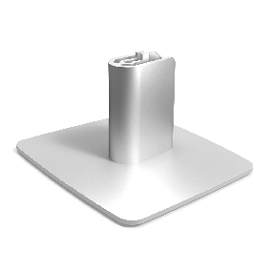
The Dynaudio Desk Stand for Xeo 10 is an elegantly designed stand for placing the speakers on a desk or shelf. Installation instructions are provided with the stand.
Wall Bracket
The wall bracket allows you to mount the Xeo 10 speakers on the wall.
VESA 100 Bracket (Xeo 10/20)

VESA is a standard for wall brackets developed by the Video Electronics Standards Association. The Xeo 10 and Xeo 20 speakers allow you to mount brackets according to the VESA 100 standard. This means that the screws on the back plate are spaced 100 mm apart.
Mounting a VESA 100 bracket (Xeo 10):

- Loosen the four screws (Torx type) and unmount the back plate.
- Keep the back plate for future use.
- Follow the instructions provided with the bracket you want to mount.
Setting up
Spikes With Pointed Ends

Xeo 30 floor-standing speakers are delivered with spikes for permanent installation on the floor. The pointed ends of the spikes may result in injuries and damage delicate floors.
- Pay attention that you do not injure yourself with the spikes.
- We recommend inserting the spikes in aluminium feet if you have delicate floors, such as parquet or laminate.
- Position the speaker in the desired location.
- Do not expose the speakers to direct sunlight, heat, or moisture.
- Do not place the speakers near devices with strong electromagnetic radiation or devices that could be destroyed or damaged by magnetic fields.
Signal Sources and Cables
Connect your signal source to the appropriate input on the Xeo 10/20/30 speaker.
The following section presents various signal sources and options for connecting to the Xeo speaker.
Notebook, Mac™, PC
- Signal source output: Optical (if available)
-
Xeo 10/20/30 input: Optical In
-
Cable: Toslink – Toslink
- Signal source output: Line out
-
Xeo 10/20/30 input: Line in
-
Cable: RCA – RCA
- Signal source output: Headphones
-
Xeo 10/20/30 input: Aux in
-
Cable: Jack 3.5 mm – 3.5 mm
Smartphone, other portable devices
- Signal source output: Headphones
-
Xeo 10/20/30 input: Aux in
-
Cable: Jack 3.5 mm – 3.5 mm
Astell&Kern
- Signal source output: Headphones
-
Xeo 10/20/30 input: Aux in
-
Cable: Jack 3.5 mm – 3.5 mm
- Signal source output: Optical
-
Xeo 10/20/30 input: Optical In
-
Cable: Toslink – Toslink
PonoPlayer
- Signal source output: Jack
-
Xeo 10/20/30 input: Aux in
-
Cable: Jack 3.5 mm – 3.5 mm
Docking station, network client, Sonos, Bluesound, etc.
- Signal source output: Line out
-
Xeo 10/20/30 input: Line in
-
Cable: RCA – RCA
- Signal source output: Optical (if available)
-
Xeo 10/20/30 input: Optical In
-
Cable: Toslink – Toslink
Google Chromecast Audio
- Signal source output: Line out
-
Xeo 10/20/30 input: Aux in
-
Cable: Jack 3.5 mm – 3.5 mm
- Signal source output: Optical
-
Xeo 10/20/30 input: Optical In
-
Cable: Mini Toslink – Toslink
Apple AirPort Express
- Signal source output: Optical
-
Xeo 10/20/30 input: Optical In
-
Cable: Mini Toslink – Toslink
Apple TV (up to 3rd generation)
- Signal source output: Optical
-
Xeo 10/20/30 input: Optical In
-
Cable: Toslink – Toslink
Hard disk, network player, CD player
- Signal source output: Line out
-
Xeo 10/20/30 input: Line in
-
Cable: RCA – RCA
- Signal source output: Optical (if available)
-
Xeo 10/20/30 input: Optical In
-
Cable: Toslink – Toslink
Analog radio, digital radio
- Signal source output: Line out
-
Xeo 10/20/30 input: Line in
-
Cable: RCA – RCA
- Signal source output: Optical (if available)
-
Xeo 10/20/30 input: Optical In
-
Cable: Toslink – Toslink
Analog record player
- Signal source output: Line out (on phono preamplifier)
-
Xeo 10/20/30 input: Line in
-
Cable: RCA – RCA
TV
- Signal source output: Headphones
-
Xeo 10/20/30 input: Aux in
-
Cable: Jack 3.5 mm – 3.5 mm
- Signal source output: Line out
-
Xeo 10/20/30 input: Line in
-
Cable: RCA – RCA
- Signal source output: Optical (if available)
-
Xeo 10/20/30 input: Optical In
-
Cable: Toslink – Toslink
Stereo preamplifier
- Signal source output: Pre-out, main out
-
Xeo 10/20/30 input: Line in
-
Cable: RCA – RCA
Stereo power amplifier
- Signal source output: Tape out
-
Xeo 10/20/30 input: Line in
-
Cable: RCA – RCA
- Signal source output: Pre-out, main out (Disconnect bridge)
-
Xeo 10/20/30 input: Line in
-
Cable: RCA – RCA
- Signal source output: Second pre-out
-
Xeo 10/20/30 input: Line in
-
Cable: RCA – RCA
Subwoofer
- Signal source output: Analog output
-
Xeo 10/20/30 input: Line in
-
Cable: RCA – RCA
AV receiver, AV processor
- Signal source output: Optical
-
Xeo 10/20/30 input: Optical In
-
Cable: Toslink – Toslink
- Signal source output: Pre-out, main out
-
Xeo 10/20/30 input: Line in
-
Cable: RCA – RCA
Division Into Audio Zones
The Xeo speakers (as well as Xeo Link) can be assigned to audio zones using the Zone selector switch. All components assigned to the same zone can be operated together via the remote control.

The picture shows a possible zone configuration.
Components of the Xeo System
Xeo consists of several high-quality components that are optimally matched. When combined, they can fulfil the most demanding requirements for a wireless multi-room and multi-source system.
Xeo speakers

The active Xeo speakers Xeo 10/20/30 receive the wireless signals from the Hub or Connect and play them back in optimal sound quality. In addition, the Xeo 10/20/30 can be connected directly to various audio sources. All speakers have an integrated amplifier and can be controlled with a remote control. Display elements indicate the operating state of the system and controls on the cabinet let you switch it on/off or change the volume without using the remote control.
Xeo remote control
The Xeo remote control can be used to turn the speakers on and off, change the volume, and select a Hub or Connect and its connected signal sources.
Dynaudio Connect and Xeo Hub


The Dynaudio Connect and Xeo Hub are the control centres for the Xeo system. Both offer a new level of wireless connectivity and convenience. Signal sources such as tuners, receivers, CD players, TVs, streaming clients, network players, MP3 players, or computers are connected to them. Signals are sent wirelessly and lossless to the connected Xeo or Focus XD speakers (or Xeo Link) where they are then played back.
Xeo Extender

The Xeo Extender extends the reception range of the Xeo Hub. As a result, Xeo speakers or other Xeo components can be operated further away from the Xeo Hub or Dynaudio Connect.
Xeo Link

The Xeo Link receives wireless signals from a Xeo Hub or Dynaudio Connect and outputs analog and digital signals from its connections. As a result, you can also connect active subwoofers, active speakers, or other components to the Xeo system.
Xeo System: Combination Examples
Below you will find several examples of Xeo component combinations. The high level of flexibility in the Xeo system enables even more variants. Ask your Dynaudio distributor to find the perfect solution for your needs.
Direct wired
Analog/digital audio sources
+ Xeo 10/20/30
Direct wireless
Bluetooth device (mobile phone, etc.)
+ Xeo 10/20/30
With Hub or Connect

Analog/digital audio sources
+ Hub or Connect
+ Xeo speaker
For Extended Range

Analog/digital audio sources
+ Hub or Connect
+ Extender
+ Xeo speaker
For additional speakers
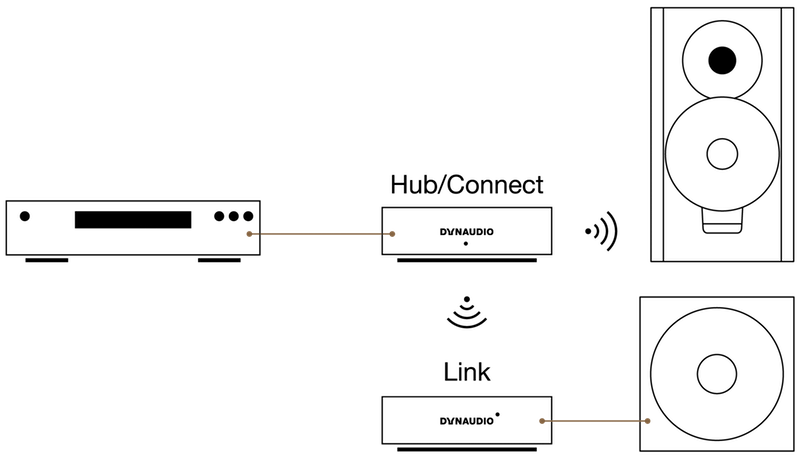
Analog/digital audio sources
+ Hub or Connect
+ Xeo speaker
+ Link
+ active component (e.g. active subwoofer, active speakers, or power amplifier and passive speakers)
Note
The Extender and Link may also be combined.
Legal Information
Declaration of Conformity (EU only)
Dynaudio A/S hereby declares, that the product Dynaudio Xeo 10 / Xeo 20 / Xeo 30 is in conformity with the following directives:
- 2001/95/EF (Product Safety)
- 2014/53/EU (RE directive)
- 2014/30/EU (EMC directive)
- 2011/65/EU (ROHS directive)
- 1275/2008 (ErP, Ecodesign directive)
The Declaration of Conformity is available on the Internet at dynaudio.com/support/manuals.
Reminding (USA and Canada only)
A polarized plug has two blades with one wider than the other. A grounding type plug has two blades and a third grounding prong. The wide blade or the third prong are provided for your safety. If the provided plug does not fit into your outlet, consult an electrician for replacement of the obsolete outlet.
This device complies with Part 15 of the FCC Rules. Operation is subject to the following two conditions: (1) This device may not cause harmful interference, and (2) This device must accept any interference received, including interference that may cause undesired operation.
Cet appareil est conforme à Ia section 15 des réglementations de Ia FCC. Le fonctionnement de l’appareil est sujet aux deux conditions suivantes: (1) cet appareil ne doit pas provoquer d’interférences néfastes, et (2) cet appareil doit tolérer les interférences reçues, y compris celles qui risquent de provoquer un fonctionnement indésirable.
Note
This product has been tested and found to comply with the limits for a Class B digital device, pursuant to Part 15 of the FCC Rules. These limits are designed to provide reasonable protection against harmful interference in a residential installation. This product generates, uses, and can radiate radio frequency energy and, if not installed and used in accordance with the instructions, may cause harmful interference to radio communications. However, there is no guarantee that interference will not occur in a particular installation. If this product does cause harmful interference to radio or television reception, which can be determined by turning the equipment off and on, the user is encouraged to try to correct the interference by one or more of the following measures:
- Reorient or relocate the receiving antenna.
- Increase the separation between the equipment and receiver.
- Connect the equipment into an outlet on a circuit different from that to which the receiver is connected.
- Consult the dealer or an experienced radio/TV technician for help.
Please take attention that changes or modification not expressly approved by the party responsible for compliance could void the user’s authority to operate the equipment.
This equipment should be installed and operated with a minimum distance 20 cm between the radiator and your body.
IC Notice
This device complies with Industry Canada licence-exempt RSS standard(s). Operation is subject to the following two conditions: (1) this device may not cause interference, and (2) this device must accept any interference, including interference that may cause undesired operation of the device.
Le présent appareil est conforme aux CNR d’Industrie Canada applicables aux appareils radio exempts de licence. L’exploitation est autorisée aux deux conditions suivantes : (1) l’appareil ne doit pas produire de brouillage, et (2) l’utilisateur de l’appareil doit accepter tout brouillage radioélectrique subi, même si le brouillage est susceptible d’en compromettre le fonctionnement.
Under Industry Canada regulations, this radio transmitter may only operate using an antenna of a type and maximum (or lesser) gain approved for the transmitter by Industry Canada. To reduce potential radio interference to other users, the antenna type and its gain should be so chosen that the equivalent isotropically radiated power (e.i.r.p.) is not more than that necessary for successful communication.
Conformément à la réglementation d’Industrie Canada, le présent émetteur radio peut fonctionner avec une antenne d’un type et d’un gain maximal (ou inférieur) approuvé pour l’émetteur par Industrie Canada. Dans le but de réduire les risques de brouillage radioélectrique à l’intention des autres utilisateurs, il faut choisir le type d’antenne et son gain de sorte que la puissance isotrope rayonnée équivalente (p.i.r.e.) ne dépasse pas l’intensité nécessaire à l’établissement d’une communication satisfaisante.
MPE Reminding
The device for operation in the band 5150 – 5250 MHz is only for indoor use to reduce the potential for harmful interference to co-channel mobile satellite systems;
The maximum antenna gain permitted for devices in the bands 5250 – 5350 MHz and 5470 – 5725 MHz shall comply with the e.i.r.p. limit; and
The maximum antenna gain permitted for devices in the band 5725 – 5825 MHz shall comply with the e.i.r.p. limits specified for point-to-point and non point-to-point operation as appropriate.
Cet équipement doit être installe et utilisé à une distance minimale de 20 cm entre le radiateur et votre corps.
Tout appareil destiné à la bande 5150 – 5250 MHz devra être exclusivement utilisé en intérieur a fin de réduire les risques de perturbations électromagnétiques gênantes sur les systèmes de satellite mobile dans un même canal.
Les radars à forte puissance sont désignés comme les utilisateurs principaux (c’est-à-dire qu’ils sont prioritaires) des bandes 5250 – 5350 MHz et
5650 – 5850 MHz. IIs peuvent provoquer des perturbations électromagnétiques sur les appareils de type LELAN (réseau de communication local sans licence) ou les endommager.
Trademarks
All Apple products are trademarks of Apple Inc.
All Sony products are trademarks of Sony Electronics Inc.
All Sonos products are trademarks of Sonos Inc.
The Bluetooth word mark and logos are registered trademarks owned by Bluetooth SIG, Inc.
All Google products are trademarks of Google Inc.
Other trademarks and trade names are those of their respective owners.
The latest version of this manual is available at dynaudio.com/support/manuals
Xeo 30
| Parameter | Value |
|---|---|
| Analog inputs | Mini-Jack (1V Max), RCA Stereo (2V Max) |
| Digital inputs | Toslink |
| Wireless | 24 bit / 96 kHz |
| Frequency response (± 3 dB) | 36 Hz to 21 kHz |
| Box principle | Bass Reflex |
| Crossover | 2½-way DSP based |
| Crossover frequencies | 200/4300 Hz |
| Woofer | 2 x 14 cm MSP |
| Midrange | - |
| Tweeter | 28 mm soft dome |
| Amplifier power | 3 x 65 W |
| AC power input | 100 V to 240 V, 50/60 Hz |
| Standby power consumption | <0.5 W |
| Maximum power consumption | 165 W |
| Weight | 13.4 kg / 29.5 lbs |
| Dimensions (W x H x D) | 180 x 825 x 246 mm 7.1 x 32.5 x 9.7 in |
| Dimensions with feet/grille (W x H x D) | 228 x 852 x 275 mm 9.0 x 33.5 x 10.8 in |
Xeo 20
| Parameter | Value |
|---|---|
| Analog inputs | Mini-Jack, RCA stereo |
| Digital inputs | Toslink |
| Wireless | 24 bit / 96 kHz |
| Frequency response (± 3 dB) | 40 Hz to 21 kHz |
| Box principle | Bass Reflex |
| Crossover | 2-way DSP Based |
| Crossover frequencies | 4700 Hz |
| Woofer | 14 cm MSP |
| Midrange | - |
| Tweeter | 28 mm soft dome |
| Amplifier power | 2 x 65 W |
| AC power input | 100 V to 240 V, 50/60 Hz |
| Standby power consumption | <0.5 W |
| Maximum power consumption | 100 W |
| Weight | 6.2 kg / 13.7 lbs |
| Dimensions (W x H x D) | 180 x 320 x 257 mm 7.1 x 12.6 x 10.1 in |
| Dimensions with feet/grille (W x H x D) | 180 x 320 x 265 mm 7.1 x 12.6 x 10.4 in |
Xeo 10
| Parameter | Value |
|---|---|
| Analog inputs | Mini-Jack, RCA stereo |
| Digital inputs | Toslink |
| Wireless | 24 bit / 96 kHz |
| Frequency response (± 3 dB) | 40 Hz to 21 kHz |
| Box principle | Bass Reflex |
| Crossover | 2-way DSP Based |
| Crossover frequencies | 5000 Hz |
| Woofer | 14 cm MSP |
| Midrange | - |
| Tweeter | 28 mm soft dome |
| Amplifier power | 2 x 65 W |
| AC power input | 100 V to 240 V, 50/60 Hz |
| Standby power consumption | <0.5 W |
| Maximum power consumption | 100 W |
| Weight | 4 kg 8.8 lb |
| Dimensions (W x H x D) | 173 x 255 x 154 mm 6.8 x 10 x 6.1 in |
| Dimensions with feet/grille (W x H x D) | 173 x 255 x 164 mm 6.8 x 10 x 6.5 in |