EarthQuaker Devices ⋅ Scrolls ⋅ Product manual ⋅ English ⋅ 🇬🇧
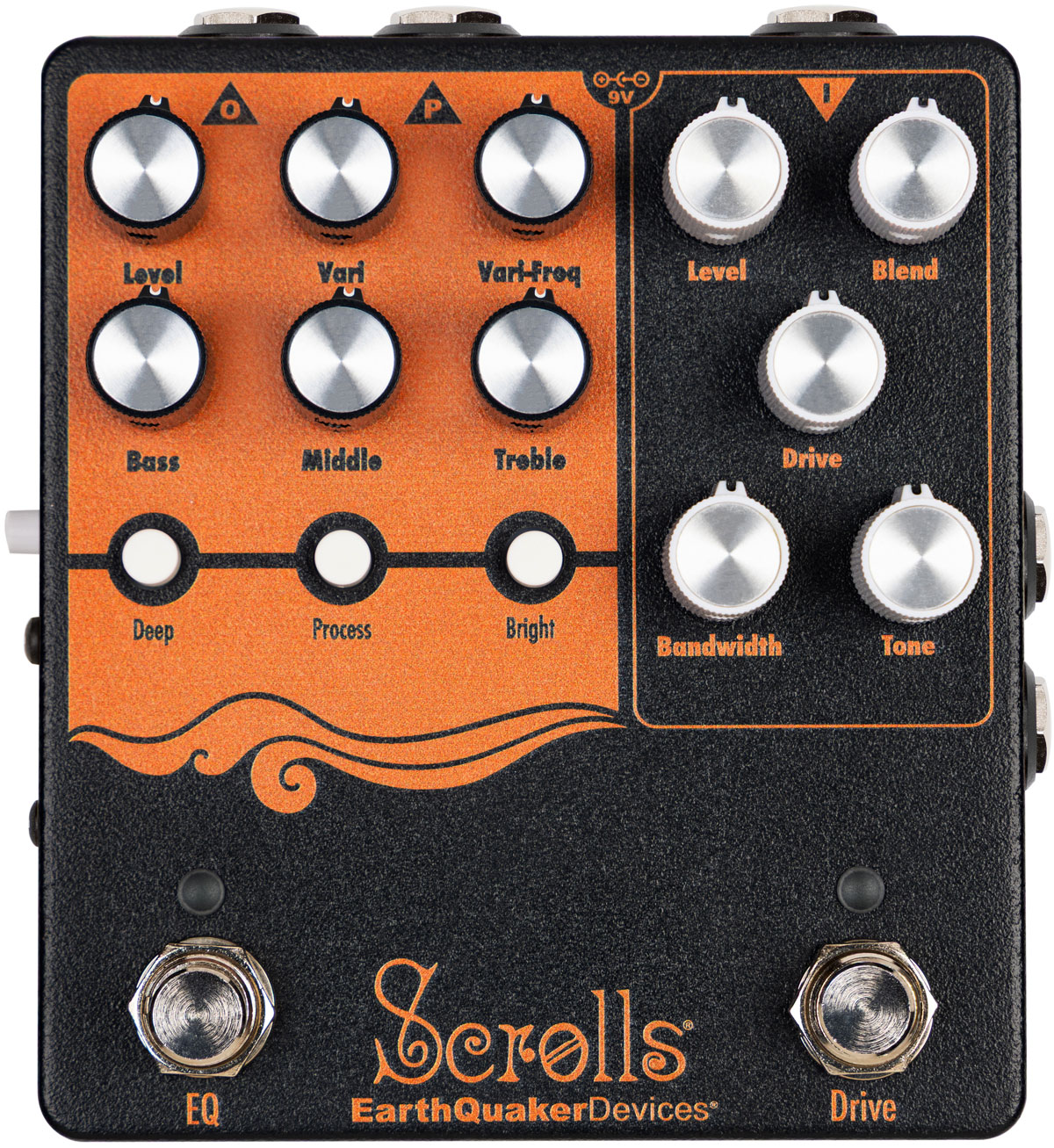
Controls, jacks, and indicators
- Drive footswitch
-
Use the Drive footswitch to activate the Drive channel.
- EQ footswitch
-
Use the EQ footswitch to activate the EQ channel.
Drive Controls
- Level
-
Use the Level control to control the volume for the Drive channel.
- Blend
-
Use the Blend control to blend between your clean signal and the Drive signal. Turn the knob fully clockwise for maximum crunchiness.
- Drive
-
Use the Drive control to set the intensity of the overdrive.
- Bandwidth
-
Use the Bandwidth control set where the clipping is most active. Turn the control counterclockwise to activate low-end clipping for a warmer, softer, rounded, and overall more subdued tone. Turn the control clockwise and activate High-end clipping for a present, focused crunch with a tighter low-end.
- Tone
-
Use the Tone control to set the cutoff frequency of a low-pass filter, enabling you to shape the frequency of the Drive channel. Turn counterclockwise to reduce highs.
EQ Controls
- Level
-
Use the Level control to adjust the output volume when the EQ controls are active. Set the knob at noon for unity, turn clockwise to boost the output signal, and turn counterclockwise to cut the output signal.
- Vari
-
Use the Vari control to boost or cut the Vari-Freq (variable frequency) control. Position this control at noon for unity (marked with a center detent in the potentiometer). Turn the control clockwise from noon to boost the Vari-Freq, or counterclockwise to cut.
- Vari-Freq
-
Use the Vari-Freq control to select a frequency for fine-tuning your tone. This setting is adjustable from approximately 20 Hz to 10 kHz.
- Treble
-
Use the Treble control to boost or cut the treble frequency range. The center position is flat and marked with a center detent in the potentiometer. All settings above this point boost the treble, and all settings below cut the treble frequencies.
- Bass
-
Use the Bass control to boost or cut the bass frequency range. The center position is flat and marked with a center detent in the potentiometer. All settings above this point boost the bass, and all settings below cut the bass frequencies.
- Middle
-
Use the Middle control to boost or cut the middle frequency range. The center position is flat and marked with a center detent in the potentiometer. All settings above this point boost the middle, and all settings below cut the middle frequencies.
- Deep
-
Use the Deep switch to activate a boost at 80 Hz.
- Process
-
Use the Process switch to activate a low-mid scoop for a more modern sound.
- Bright
-
Use the Bright switch to activate a boost at 5 kHz.
- Parallel Out (P) jack
-
The Parallel Out (P) jack is a buffered output carrying your clean signal that is always active. This allows you to route your clean signal to external destinations (amp, DI, separate pedal chain, tuner, etc.).
- Direct Out (on side)
-
This is a balanced XLR output with a subtle amount of analog filtering added to the signal path to simulate the tonal characteristics of a bass speaker cabinet.
- Ground Lift button (on side)
-
Press this button for ground lift on the XLR output.
Effects Loop (Send and Return jacks)
Situated between the Drive and EQ stages, this passive loop keeps your modulation and time-based effects after the Drive, but before the EQ in your signal chain. This allows you to keep any effects you’d normally place near the middle or end of your chain sounding crisp while maintaining the ability to apply the EQ to your entire wet signal. The Effects Loop is hard-wired into the signal path and remains active at all times.
Switching
The Scrolls pedal uses relay-based true bypass switching. Since the switching is relay-based, it requires power to pass a signal.
The Drive side of Scrolls uses Flexi-Switch® Technology! This relay-based, true bypass switching style allows you to simultaneously use momentary and latching style switching.
For standard latching operation, tap the footswitch once to activate the effect and then tap again to bypass.
For momentary operation, hold the footswitch down for as long as you’d like to use the effect. Once you release the switch, the effect will be bypassed.
The EQ side of Scrolls uses standard on/off switching.
Power
This device takes a standard 9-volt DC power supply with a 2.1-millimeter negative center barrel. We recommend using a pedal-specific, transformer-isolated wall-wart power supply or a power supply with multiple isolated outputs. Pedals will produce extra noise if there is ripple or unclean power. Switching-type power supplies, daisy chains and non-pedal specific power supplies do not always filter dirty power and may result in unwanted noise.
Do not run this pedal at higher voltages!
Technical specifications
- Drive Input Impedance
-
500 kΩ
- Drive Output Impedance
-
100 Ω
- EQ Input Impedance
-
10 MΩ
- EQ Output Impedance
-
<1 kΩ
- Parallel Input Impedance
-
10 MΩ
- Parallel Output Impedance
-
100 Ω
- Direct Out Impedance
-
100 Ω
- Current Draw
-
70 mA
- Artwork
-
Geoffrey Crowe
Technical specifications

- 57 mm

- 114 mm

- mm
↻ 2026-06-14